


 chadtmiller.com/monolith
An atproto PDS
Monolith
Monolith is an atproto PDS that keeps its state in write-ahead logs on local disk, with no database beside it. A write is synced before it's answered, so it survives the server being killed at any moment. Each account is loaded when it's first used, so memory stays within the server's base, a cache (256 MiB by default) and 4 KiB an account, however much the accounts hold.
It speaks the same XRPC, OAuth and firehose as the reference PDS
(@atproto/pds), so the Bluesky app, relays and AppViews talk to it like
any other PDS. It answers like the reference in every check of the
compatibility suite. Every method is also a pds command and an MCP tool,
so an AI app such as Claude can sign in and work with your account.
It's one Rust binary. In the benchmark it wrote records ~25 times as fast as the reference (2,492/s against 99/s), started in 239 ms against 3.4 s, and idled at ~20 MiB against ~378 MiB (on an M1 Pro, in Docker: bench/RESULTS.md).
Highlights
- Behaves like the reference. Every area of the server is run beside
@atproto/pdswith the same seeded random requests, every answer is compared, and the server's whole repository is verified with the reference's own library. A difference fails the gates. → Comparing with the reference, Compatibility - Its own storage. Writes waiting at the same time share one sync,
whichever accounts they're for, through a shared journal (
PDS_SYNC). The server compacts its logs in the background, so the data directory stays within three times what its accounts hold. Blobs can go in an S3-compatible bucket instead. → Operating, STORE.md - Three ways to call it. Every method is an XRPC call, a
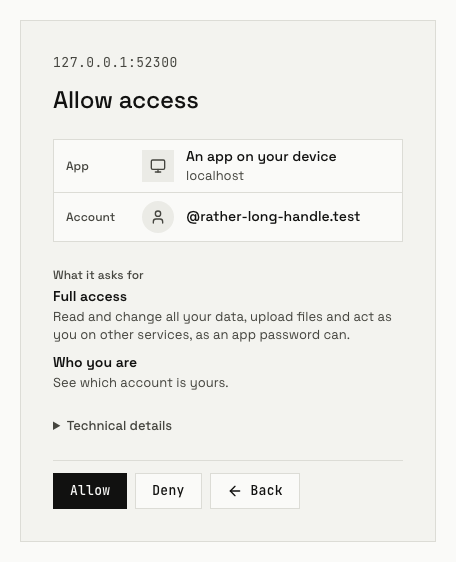
pdscommand and a tool on the MCP endpoint, all made from its lexicon. An MCP client signs in with OAuth on the server's own pages. → Calling the server - OAuth and passkeys. The server is the OAuth authorization server for its accounts, with its own sign-in and consent pages. An account can sign in there with a passkey instead of its password. → OAUTH.md, PASSKEYS.md
- Spaces. It serves permissioned data from atproto's spaces proposal,
OAuth
space:permissions included, checked against the reference's pinned spaces alpha. → SPACES.md - Fast and small. Beside the reference in the benchmark, it served the request mix at 2,483/s against 299/s, and peaked at 167 MiB against 806 MiB. → Benchmark, results
Quickstart
You need a Linux server, a domain with a wildcard record under it, a reverse proxy holding TLS for both, and an SMTP server. Getting started walks through each one.
docker pull knotless.dev/chadtmiller.com/monolith
Put the settings in pds.env (Getting started lists them), then run it
and check that it answers through your proxy:
docker run -d --name monolith --restart unless-stopped \
  -p 127.0.0.1:2583:2583 -v pds-data:/data --env-file pds.env \
  knotless.dev/chadtmiller.com/monolith
curl https://pds.example.com/xrpc/_health
Make an invite code as the admin, then the first account with it:
export PDS_URL=https://pds.example.com
PDS_ADMIN_PASSWORD=… pds server create-invite-code --use-count 1
pds server create-account --handle alice.pds.example.com \
  --email alice@example.com --password '…' --invite-code <the code>
The CLI is the same pds binary. With Docker, run it as docker run --rm -e PDS_URL -e PDS_ADMIN_PASSWORD knotless.dev/chadtmiller.com/monolith.
The binary for Linux x86-64 is on the
releases page.
Docs
The docs site is at https://chadtmiller-com.knotless.page/monolith/, built
from docs/, the spec and the reference pages.
| Getting started | Get the image or the binary, configure it, run it, make the first account |
| Calling the server | XRPC, the pds CLI, the MCP endpoint, connecting an AI app |
| Deploying | The image, the proxy, the environment, blobs in a bucket, backups |
| Operating | The log, health, metrics, traces, upgrades, disk and memory |
| Comparing with the reference | The harness's runs, performance, the benchmark, the compatibility check |
| Contributing | Working from a clone, a server to try, the gates, releases |
| PDS.md | The specification: what the server does, with a page for each area |
| COMMANDS.md | Every method as an MCP tool and a CLI command |
| Compatibility | How closely other PDSes behave like the reference |
| Benchmark | Monolith beside other PDSes, and how it's run |
Layout
| Path | |
|---|---|
spec/ | The specification. PDS.md links a page for each area, and beside them are the specs it rests on (atproto's, the RFCs, WebAuthn, the spaces proposal, MCP's), the lexicons and the test vectors |
harness/ | Runs the server beside the reference and compares them: compare.mjs and its checks/, the upgrade run, perf.mjs, the benchmark, the compatibility check, the gates, look.mjs and the spaces run |
web/ | The OAuth authorization pages, a Svelte 5 app that pds-server embeds at compile time (web/AGENTS.md) |
crates/pds-repo | The data model (DAG-CBOR, CIDs), the MST, signed commits and CAR files, with no I/O, checked by atproto's test vectors |
crates/pds-store | The append-only log the server keeps its state in |
crates/pds-lexicon | The lexicons as data: each method's arguments, and the MCP tool and CLI command made from it |
crates/pds-server | The PDS: XRPC, the firehose, the MCP endpoint and OAuth. Each area's methods are a module of their own, named in lib.rs's AREAS |
crates/pds-cli | The CLI, a client of a running server |
crates/pds | The one binary, pds. Its allocator is jemalloc, built by .cargo/config.toml to give freed memory back at once, so resident memory follows what's in use (spec/STORE.md, "Scale") |
Dockerfile | The image (Deploying). .knotless/image.sh makes the released one from the same binary |
.changeset/, CHANGELOG.md, knope.toml | Change files for the next release, what each version changed, and how knope makes a release (Contributing) |
docs/ | The guides |
docs-site/ | The docs site, built with Astro from docs/, spec/, the lexicons, compat/ and bench/. Its landing page's words follow .claude/skills/landing |
compat/, bench/ | The compatibility check's and the benchmark's pages and results |
The Rust is one flat workspace. Every crate sits one level down in
crates/, and the root Cargo.toml holds only the workspace, its shared
package fields and its dependencies' versions.
Development
You need Rust through rustup and the Node version .node-version names.
(cd harness && npm ci) && (cd web && npm ci)
just dev --seed     # a server to try, with accounts in it
just quick          # a short harness run of each kind, while you work
A change goes spec first, then a harness check that fails, then the
server (AGENTS.md). just gates runs
everything on the runner when you push.
Contributing has the rest.
Known gaps
- A server started from a backup doesn't handle the rollback. It numbers its firehose events again from the backup's last one, and doesn't tell any relay or AppView to sync its accounts again.
- There are no OAuth account pages (
/account). An account lists and ends its OAuth sessions and devices withpds oauth …and theoauth_tools instead (OAUTH-ACCOUNT.md), and adds and removes passkeys withpds passkey …and thepasskey_tools (PASSKEYS.md). - Passkeys are ES256 or RS256, with only
noneattestation. - There's no sign-up from the authorization page.
- The authorization page shows a
space:permission as its scope string instead of describing it in words (OAUTH-SCOPES.md, "Spaces"). - The CLI and the MCP tools take only
Bearertokens, so an OAuth token can't be used through them (OAUTH-SCOPES.md). - Permission sets are resolved through DNS, and the harness can't serve
that to both sides. It checks them through
PDS_LEXICON_AUTHORITY_DID, and the server's own tests check the DNS lookup. - The server makes only
did:plcaccounts. Adid:webaccount moves in with a service token its owner signs (MIGRATION.md). resolveHandleanswers only its own accounts' handles, and doesn't ask anyone else.- Of the sync methods, it serves
getRepo,getLatestCommit,subscribeRepos,listRepos,getRepoStatus,getBlocks,getRecord,getBlobandlistBlobs. It sendsrequestCrawlto its crawlers but doesn't serve it. - No MCP tool uploads or reads blobs, or imports a repository.
upload-blob,get-blobandimport-repoare CLI commands only. - MCP serves only tools. There are no resources, prompts or
subscriptions/listen. - Mail sent over SMTP (
EMAIL.md) isn't an outbound request in the sense ofOPERATIONS.md, so it has no span and nopds_outbound_*metrics.
License
MIT or Apache-2.0, at your option: LICENSE-MIT,
LICENSE-APACHE. The specs, lexicons and RFCs vendored
under spec/ keep their own licenses, which sit beside them.