


 johnandersen777.bsky.social/socialweb-computer-console
console.socialweb.computer: kcp, kubectl and ssh compiled to wasm in a browser tab with a terminal; a kcp fork
description: > Understanding kcp component communication patterns and architecture for production deployments.
Architecture Overview
Understanding kcp's component communication patterns is essential for designing production deployments. This guide explains how different kcp components interact and the network requirements for each deployment pattern.
kcp Component Communication
In general, shards do not communicate directly with each other; all communication is proxied via the front-proxy or cache server.
Front-Proxy
The main API endpoint for clients to access kcp. This is the main entry point for all external consumer clients.
Communication patterns:
-
Shards do not communicate directly with the front-proxy, except in two cases:
-
Workspace scheduling: When a new workspace is scheduled, the shard contacts the front-proxy to randomly pick a shard for the new workspace
-
Endpoint updates: When an
APIExportEndpointSliceorClusterCachedResourceEndpointSliceURL is updated, the update happens via the front-proxy
-
Configuration:
- Set
--externalHostnameorspec.external.hostnamein front-proxy or shard configurations
Shards
Individual kcp shards that host workspaces. Shards can be exposed publicly or kept private. And by public, we mean accessible from outside the cluster network.
This means that clients like kubectl or kcp CLI can access the shard directly if needed and interact with workspaces hosted on that shard from outside the cluster network.
Configuration:
- Set
spec.shardBaseURLin the shard spec, or--shard-base-urlflag in the shard deployment - This URL exposes the main shard API server endpoint that the front-proxy uses to communicate with the shard
Virtual Workspaces
kcp supports running virtual workspaces outside shards, but the recommended approach is to run virtual workspaces inside shards.
Configuration:
- Separate flag:
--virtual-workspace-base-url(defaults tospec.shardBaseURL) - External virtual workspace clients need access to these URLs
URL Configuration Examples
After deployment, you can verify the configuration by checking shard objects:
kubectl get shards
Output example:
NAME    REGION   URL                                               EXTERNAL URL                                   AGE
alpha            https://alpha.comer.example.com:6443             https://api.comer.example.com:443             6d20h
root             https://root.comer.example.com:6443              https://api.comer.example.com:443             6d20h
Detailed shard specification:
kubectl get shards -o yaml | grep spec -A 3
Output example:
spec:
  baseURL: https://alpha.comer.example.com:6443
  externalURL: https://api.comer.example.com:443
  virtualWorkspaceURL: https://alpha.comer.example.com:6443
--
spec:
  baseURL: https://root.comer.example.com:6443
  externalURL: https://api.comer.example.com:443
  virtualWorkspaceURL: https://root.comer.example.com:6443
Virtual Workspace Endpoints
The virtualWorkspaceURL is used to construct VirtualWorkspace endpoints. External virtual workspace clients need access to these URLs.
Example endpoint slice:
KUBECONFIG=kcp-admin-kubeconfig.yaml kubectl get apiexportendpointslice tenancy.kcp.io -o yaml | grep endpoints -A 2
Output:
endpoints:
  - url: https://root.comer.example.com:6443/services/apiexport/root/tenancy.kcp.io
  - url: https://alpha.comer.example.com:6443/services/apiexport/alpha/tenancy.kcp.io
External clients like syncer must be able to access these URLs.
URL Defaulting Logic
The system applies the following defaulting logic:
if shard.Spec.ExternalURL == "" {
    shard.Spec.ExternalURL = shard.Spec.BaseURL
}

if shard.Spec.VirtualWorkspaceURL == "" {
    shard.Spec.VirtualWorkspaceURL = shard.Spec.BaseURL
}
High-Level Architecture
Network Requirements by Deployment Type
kcp-dekker (Self-Signed)
- Public access: Front-proxy only
- Private network: Shards communicate via cluster-internal DNS
- Certificate trust: Clients need CA certificate in trust store
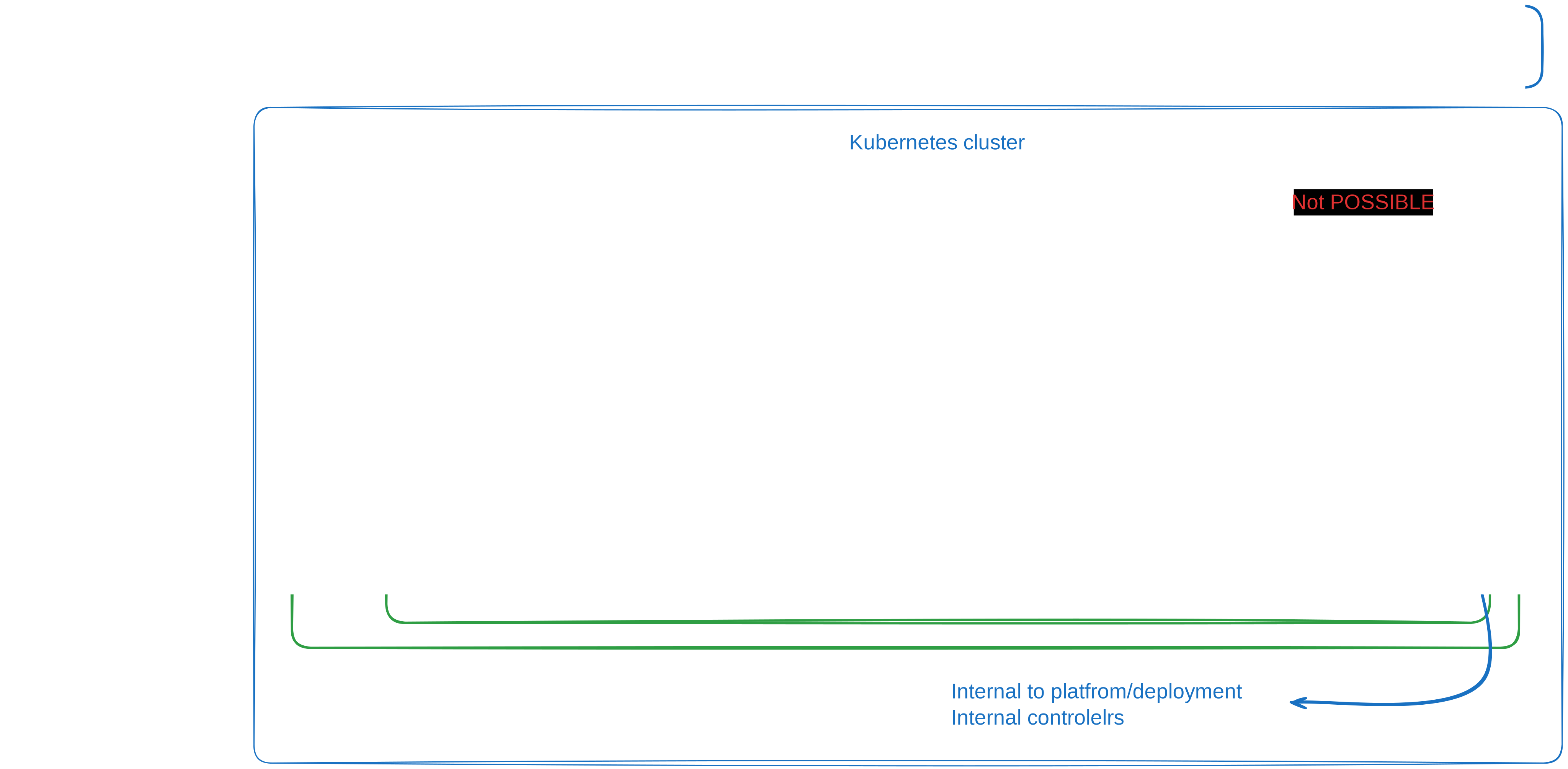
kcp-vespucci (External Certs)
- Public access: Front-proxy and shards
- External DNS: Public DNS records for all endpoints
- Certificate validation: Automatic via Let's Encrypt
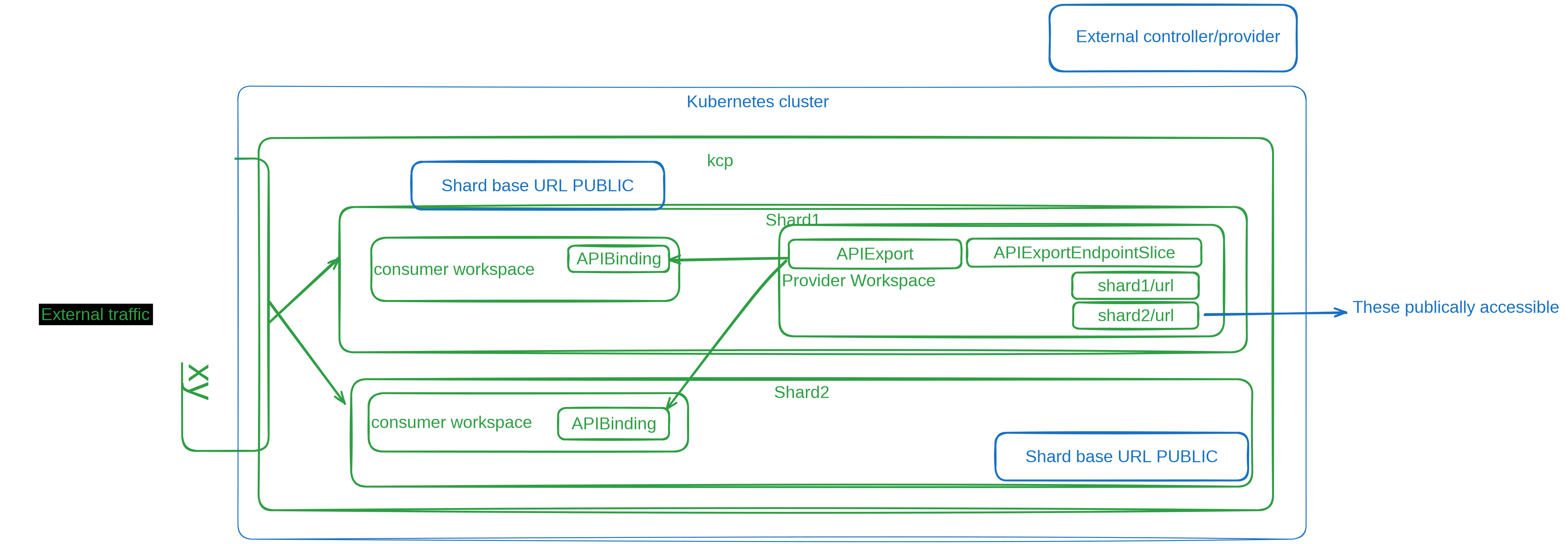
kcp-comer (Dual Front-Proxy)
- Public access: CDN edge and front-proxy
- Edge encryption: CloudFlare integration
- Certificate management: Mixed (edge + internal)
In this scenario we have two front-proxy. One secured by CloudFlare, but working only with OIDC auth, and another internal front-proxy secured by an internal CA for internal clients.
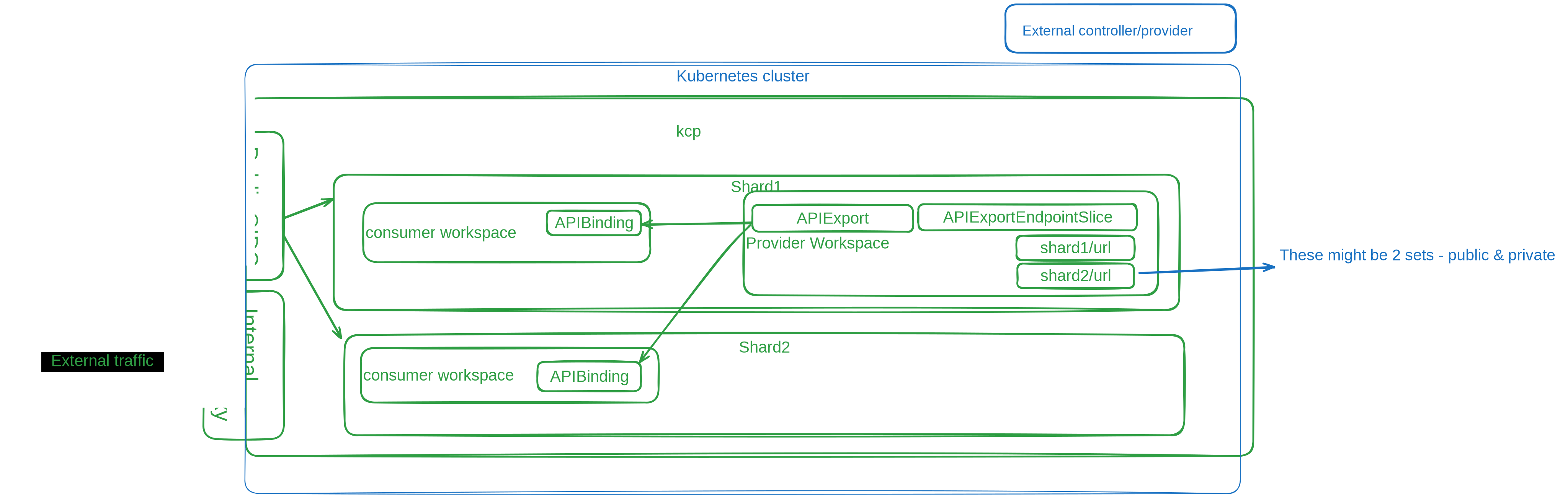
Understanding these patterns will help you choose the appropriate deployment strategy and configure networking correctly for your environment.